On This Page
Check EPF Balance 2026: Interest Credited, SMS, Missed Call
Check your PF (Provident Fund) balance in 30 seconds using UMANG app, EPFO portal, SMS, or missed call: no office visit needed

Updated August 2026
EPFO has credited 8.25% interest for FY 2025-26, with entries appearing in passbooks from 15 July 2026. Roughly ₹1.44 lakh crore is flowing to about 34 crore accounts in phases.
If your passbook does not show it yet, wait a few days and check again. Interest is never lost by late posting: the amount is calculated from April 2025 regardless of when the entry lands.
Need a 50KB photo for this form?
Resize your photo and signature to the exact size any form needs. Free, instant, and your photo never leaves your phone.
🕐Interest Not Showing Yet? Read This Before Panicking
Crediting runs in phases across 34 crore accounts, so two colleagues can see their FY26 entries weeks apart. A blank interest row in early August means queued, not skipped.
Confirm the basics first: UAN active, mobile registered, and you are looking at the current member ID rather than an old employer's account.
If mid-September arrives with no entry, raise it on epfigms.gov.in with your UAN and a passbook screenshot. Interest is computed from April 2025 either way, so late posting never shrinks the amount.
The new EPF Scheme notified on 29 June 2026 reworks withdrawal categories and processes. It does not touch your accumulated balance, your UAN, or the interest rate.
Everything you have already earned carries over untouched. Only the withdrawal paperwork changes going forward.
EPF interest for FY 2025-26 is 8.25% per annum, unchanged for the third straight year. It is calculated monthly and credited annually after government approval.
Compare that to SBI FD around 7% or Post Office around 7.5%: EPF wins on both return and tax treatment. This is why never withdrawing PF on a job change is the number one retirement rule.
📋What is EPF Balance and PF Passbook?
EPF stands for Employees' Provident Fund: a mandatory savings scheme where your employer deducts 12% from your salary and deposits it into your retirement account with EPFO. Your EPF balance is the total amount accumulated from all your contributions and employer contributions throughout your employment.
Your EPF balance includes three components: (1) Your contribution (12% of basic salary deducted every month), (2) Employer contribution (12% matched by your employer), (3) Interest earned annually (8.25% for FY 2024-25, decided by EPFO each year). The balance grows monthly as contributions are deposited and annually as interest is credited.
PF Passbook is the official record showing month-wise contributions, interest, and current balance. It's legally equivalent to a bank passbook.
You can download it as PDF from the EPFO portal and use it for: loan applications (as proof of savings), background checks (as proof of employment), retirement planning (to know your accumulated amount).
Under the 'Universal Account Number' (UAN) system, all your EPF accounts across different employers are consolidated into one account. So even if you worked for 5 companies, you have one UAN and one balance showing all contributions combined.
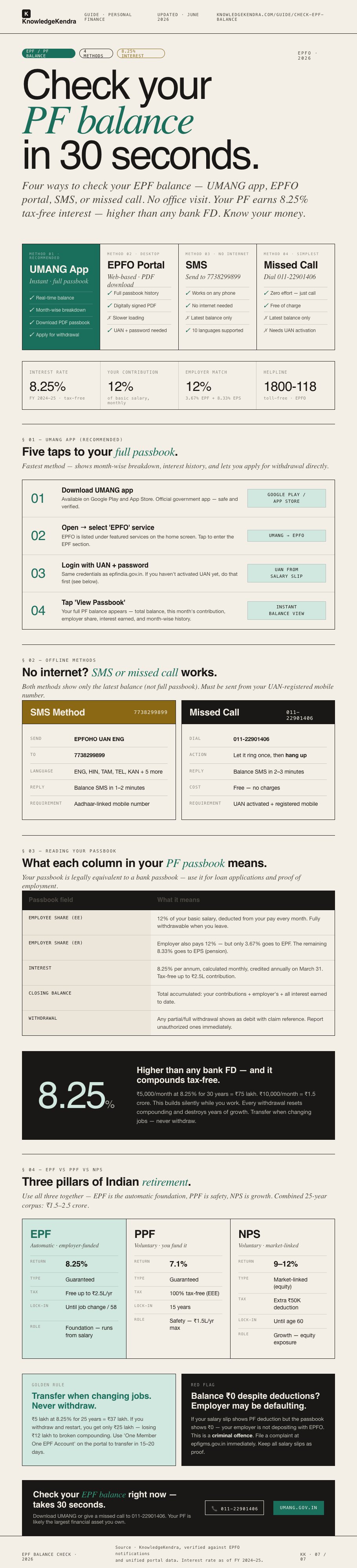
For most people, UMANG app is the fastest way to check EPF balance: shows full passbook with interest history. SMS/missed call methods only show the latest balance (no transaction history).
Which Method Should You Use?
📱Method 1: Check via UMANG App (Fastest & Best)
Why UMANG wins: instant balance with the full month-wise passbook, plus withdrawal application and claim tracking in the same app. It is the closest thing to carrying the EPFO office in your pocket.
Download UMANG from Google Play or the App Store and pick the EPFO service inside. Log in with your UAN and password, the same credentials as the member portal.
Open View Passbook and every employer account under your UAN appears. You can download the passbook as a PDF for records or loan applications.
Method 2: EPFO Portal Step-by-Step
⚡Portal Slow? Use Passbook Lite
Around salary-credit and interest-credit weeks, the main passbook portal crawls under traffic. Passbook Lite is EPFO's stripped-down alternative on the same login screen.
It loads a running balance summary without the full transaction grid, so it opens even when the full portal times out. Same UAN and password, nothing extra to register.
Use Lite for a quick balance confirmation and the full passbook when you need the month-wise history.
Bookmark both: Lite for the 10-second check on payday, full passbook for the March annual verification. Same data underneath, different depth.
📲Method 3: Check via SMS (No Internet Needed)
How it works: Send a specially formatted SMS from your UAN-registered mobile number. No internet needed: works on any phone (even 2G).
Steps: Open your phone's SMS app. Send message to 7738299899 with format: EPFOHO UAN ENG (replace ENG with your language code: HIN for Hindi, TAM for Tamil, TEL for Telugu, KAN for Kannada, etc.).
Your PF balance reply comes in 1-2 minutes via SMS showing: 'Your EPF Balance: ₹XXXXX. Last credit: DD/MM/YY.'
Important: The SMS must be sent from the mobile number registered with your Aadhaar (same number linked with your UAN). If the number doesn't match, SMS doesn't reply.
Language codes cover 10 options: ENG English, HIN Hindi, TAM Tamil, TEL Telugu, KAN Kannada, MAL Malayalam, BEN Bengali, MAR Marathi, GUJ Gujarati, PUN Punjabi. The reply arrives in the script you asked for.
The reply SMS also shows your last contribution amount and KYC status alongside the balance. If KYC shows unlinked, fix that on the portal because claims will stall on it later.
☎️Method 4: Check via Missed Call (Simplest)
How it works: give a missed call from your UAN-registered mobile and an SMS reply brings your balance. No credentials, no internet, works on any phone.
Steps: dial 9966044425 from the registered number and let it ring once. The call cuts automatically, and the SMS with your balance and last contribution arrives within 2-3 minutes.
Prerequisite: your UAN must be active and linked with Aadhaar, PAN, or a bank account. Without that KYC seeding, the service stays silent.
The old number 9966044425 has been replaced in EPFO's current communications. If it stopped responding for you, 9966044425 is why.
Limitation: the missed call shows only the last posted balance, not the full history. For the month-wise passbook, use UMANG or the portal.
📖Understanding Your PF Passbook
| Field | Meaning |
|---|---|
| Contribution Period | The month/year when contribution was deposited |
| Employer Contribution | 12% of your basic salary deposited by your company |
| Employee Contribution | 12% of your basic salary deducted from your salary |
| Interest | Annual interest credited (8.25% for FY 2024-25), shown as extra amount in year-end months |
| Balance | Cumulative total of all contributions + interest up to that date |
| Closing Balance | Your total PF amount as of the last contribution date |
➗Why Employer Share Looks Smaller: The EPS Split
Your 12% goes fully into EPF, but the employer's 12% splits: 3.67% to EPF and 8.33% to the pension scheme EPS. The passbook shows these as separate columns.
EPS contributions are capped at a ₹15,000 wage ceiling, so a maximum of ₹1,250 a month flows there regardless of your actual salary. Whatever remains of the employer's 12% lands in EPF.
This split is why the employer column never matches yours rupee for rupee. It is design, not a shortfall, and the EPS side funds your pension after 58.
Quick check: multiply your basic by 3.67% and that should match the employer EPF column each month. A mismatch there is worth one question to payroll.
EPF earns 8.25% interest annually (FY 2024-25): higher than any bank FD. Your money compounds tax-free until withdrawal.
Are You Eligible to Use These Methods?
- You are a salaried employee with PF deduction
- Your UAN (Universal Account Number) is activated
- Your mobile number is linked to UAN (Aadhaar seeded)
- Your KYC is complete (Aadhaar + PAN + Bank)
- Your employer has been depositing PF regularly
- You can access epfindia.gov.in or have a mobile phone
- Your UAN is not yet activated (must activate first)
- Mobile number not registered with UAN
- KYC incomplete (PAN or Aadhaar pending)
- Employer never deposited PF (raise complaint instead)
- You are self-employed (use PPF or NPS instead)
- Government employee (use GPF portal, different system)
⚠️Common Reasons Your Balance Might Be Wrong
Fresh salary but last month shows nothing: contributions post with a 7-15 day lag after month-end. Wait ten days after payday before worrying.
Balance looks low for your years of service: the usual cause is an old employer's PF sitting untransferred under a previous member ID. Check the transfer history on the portal.
Some employers also deduct PF on a reduced base, and probation months may carry no deduction at all. Your salary slips against the passbook reveal which one happened.
Balance stuck at ₹0 despite months of work: either your UAN is not activated, or the employer is not depositing. Activate at unifiedportal-mem.epfindia.gov.in first, then compare slips against the passbook.
Two months showing identical balance means a missed deposit for one of them. One-off delays happen, but repeated flat months are a default pattern worth escalating.
Forgot UAN Password? Reset in 4 Steps
🔧What to Do if PF Balance is Missing or Wrong
Start with HR: ask whether your PF for the specific month went to EPFO and what balance their payroll system shows. Most gaps are payroll timing, not fraud.
If HR says deposited but the passbook disagrees, file at epfigms.gov.in with your company name, UAN, and salary slips attached. EPFiGMS is EPFO's own grievance channel and generates a trackable complaint number.
No movement there means a visit to the nearest EPFO office with slips and a passbook screenshot. They can see employer remittance records you cannot.
If the employer is genuinely defaulting, that is a criminal offence under the EPF Act, and EPFO recovers with penalty. Keep every payslip for 7+ years: they are your proof that deduction happened.
🔗Official EPFO Addresses You Will Need
Passbook and balance: passbook.epfindia.gov.in with your UAN login. Member services like claims and KYC live at unifiedportal-mem.epfindia.gov.in.
Mobile: the UMANG app from Play Store or App Store carries the full EPFO service set, including passbook PDF download.
Complaints: epfigms.gov.in is the EPFO grievance system for missing deposits and stuck claims. Office addresses sit on epfindia.gov.in under the office locator.
Source: EPFO under the Ministry of Labour and Employment, at epfindia.gov.in. Rates and credit dates verified against EPFO communications for FY 2025-26.
For the latest circulars, check the official portal directly.
🔑UAN activation: prerequisite for online access
UAN is your key to everything online: no activated UAN, no passbook, no claims. Find it on your salary slip or ask HR.
Activate at unifiedportal-mem.epfindia.gov.in through Activate UAN, using your UAN, Aadhaar, name, and mobile. The OTP lands on your Aadhaar-linked number.
After activation, link Aadhaar, PAN, and bank under Manage and KYC. The employer approves KYC within about a week, and then claims and transfers work online.
If activation fails, the cause is almost always a mismatch: name spelling or DOB differing between employer records and Aadhaar. HR has to correct the employer-side entry before the portal will accept you.
🎯EPF and retirement planning
Check your balance now and project it forward. ₹5 lakh today at 8.25% for 20 more years becomes about ₹24.5 lakh with zero additions.
Add ₹5,000 monthly for those 20 years and roughly ₹36 lakh more stacks on top. That is ₹60 lakh from money you never had to think about.
The inflation catch: ₹60 lakh at 5% inflation buys what ₹22.5 lakh buys today. EPF alone rarely funds a full retirement, so PPF and NPS layers matter.
Annual habit: every March, download the passbook and verify all 12 months landed, the interest posted, and the employer share matches. Discrepancies caught early are paperwork, caught at retirement they are lawsuits.
VPF: you can contribute beyond the mandatory 12%, up to 100% of basic, at the same 8.25% and same tax treatment up to the ₹2.5 lakh limit. One email to HR sets it up.
🔓EPF withdrawal rules: when you can access
Full withdrawal needs a job exit plus 60 days of unemployment, and the employer must mark your exit date in the system first. After 5 years of continuous service it is tax-free, before that TDS applies.
Partial withdrawal while employed covers defined needs: medical at any service length, house purchase after 5 years, marriage and education after 7. Each category has its own wage-multiple cap.
Changing jobs means transfer, never withdrawal. ₹5 lakh left compounding at 8.25% for 25 years is about ₹37 lakh, while withdraw-and-restart lands near ₹25 lakh.
Online claims run through the member portal: Online Services, then Claim, verified with Aadhaar OTP. The employer approves within days and EPFO processes in 10-20 days.
What Rs 10,000/month becomes in 30 years at 8.25%
EPF compounds silently while you work. Rs 5,000/month at 8.25% for 30 years equals approximately Rs 75 lakh. Rs 10,000/month equals Rs 1.5 crore. Every withdrawal resets compounding and destroys years of growth. The discipline of never touching EPF until retirement is the single biggest wealth-building lever for salaried Indians.
💰EPF Interest and Tax: What Is Taxable, What Is Not
Current rate: 8.25% for FY 2025-26, held at that level for three consecutive years. Among guaranteed government instruments, only some small savings schemes come close.
For most people, EPF interest is simply not taxable. It stays tax-free as long as your own annual contribution is within ₹2.5 lakh.
Above ₹2.5 lakh of employee contribution per year, the interest on the excess is taxed at your slab rate, a rule in force since FY 2021-22. That mainly touches high earners and heavy VPF users.
Withdrawal tax is separate: after 5 years of continuous service, withdrawals are tax-free. Before 5 years, TDS of 10% applies with PAN.
Compounding math: ₹5,000 monthly at 8.25% for 30 years is about ₹75 lakh. Every early withdrawal restarts that clock, which is the real cost nobody sees on the claim form.
👥EPF for different employee categories
Basic salary below ₹15,000: EPF enrolment is mandatory for you in any establishment with 20+ employees. The ₹15,000 line defines who must be covered, and employers cannot skip you below it.
Basic above ₹15,000: coverage depends on whether you were already an EPF member. Most employers enrol everyone anyway, but confirm your first payslip shows the deduction rather than assuming.
Contract workers: both the contractor and the principal employer carry EPF liability for you. Many contract workers lose years of PF because neither party files, so check your UAN passbook within two months of joining.
Frequent job changers: transfer through One Member One EPF Account on the portal at every switch. Five transfers over 15 years keeps one unbroken compounding streak, while five withdrawals resets it to zero each time.
Nearing retirement at 55-58: the account keeps earning 8.25% until withdrawal, and for a while after you stop contributing. ₹20 lakh left untouched for three more years adds roughly ₹5.4 lakh of pure interest.
EPF vs PPF vs NPS: Which Retirement Product Wins
🧱Stack All Three: The ₹2 Lakh Deduction Play
The card above shows the head-to-head. The strategy is to use all three at once, not pick a winner.
EPF runs automatically from salary. Add PPF at ₹1.5 lakh a year for the 80C deduction, then NPS at ₹50,000 for the extra 80CCD(1B) deduction.
That is ₹2 lakh of deductions, worth about ₹62,400 in tax saved yearly at the 30% slab. Your EPF is likely the largest single asset you will ever own: check it like you would check a bank account.
EPF Interest Rate History (Last 5 Years)
If your salary slip shows PF deduction but the passbook shows ₹0, the employer is holding money that legally belongs in EPFO. That is a criminal offence under the EPF Act.
File at epfigms.gov.in immediately with salary slips attached. EPFO pursues defaulting employers with recovery plus penalty.
📌 You might also need
Not sure if you qualify?
Check your eligibility for 50+ government schemes in 2 minutes. No login, no fees. Just answer a few simple questions.
❓Frequently Asked Questions
📋 Official Sources & Verification
Information verified against official government portals and gazette notifications. Read our editorial process.
August 2026